How to reduce no-shows: 7 methods that work in any appointment business
Most clients who miss their appointment aren't careless: they forgot, or had no way to let you know in advance. Seven methods, from the reminder 24 hours before to each client's individual profile, with examples from different trades.
Reminders at 24 h and 1 h
the first to cancel in time, the second not to forget
Cancel in one click
a slot freed today can still be filled
Attendance confirmation
know in advance who you can count on
A written rule, not a negotiated one
on the booking page, not over the phone
Every client's record
who has missed before, and how often
10:00. The chair is ready, the instruments are sterilised, the patient’s file is open on the screen. At 10:15 there is still no patient, and their phone rings unanswered. By 10:30 it is clear: nobody is coming to this appointment.
Every business that runs on appointments knows the scenario. Only the setting changes: a stylist’s chair, a lift in a garage, a treatment table in a physiotherapy room. And the damage is bigger than it looks. You don’t just lose the price of the service, but also the hour you could have given to someone else, the preparation done for nothing and, quite often, the client who could only come in the slot that was already booked.
The losses are quick to work out. A 300 lei colour at the salon, a 200 lei consultation at the dentist, a 90-minute service at the garage. Two or three gaps like that a week add up, by the end of the month, to a considerable sum.
The good news is that most clients who miss their appointment aren’t careless. They forgot, or changed their mind and found no convenient way to tell you. Both problems can be solved, and the seven methods below work just as well in a salon, a practice, a garage or a studio. Only the examples differ.
1. Send the reminder at the right moment
One reminder sent the day before beats none. Two, sent at different moments, are better still, because they do different jobs:
- the 24-hour reminder gives a client who can no longer come the chance to tell you while you can still offer the slot to someone else
- the one-hour reminder catches the client who would have remembered too late, or not at all
In a fitness studio, the difference shows in the first week. Places freed a day ahead get taken again. Places freed ten minutes before the class stay empty. A reminder doesn’t persuade people to come; it gets them to tell you in time. And that is exactly what you need.
In Programări Rapide, both reminders go out automatically, by email, for every booking, including the ones you enter yourself when someone calls. You adjust their wording from the Emails screen.
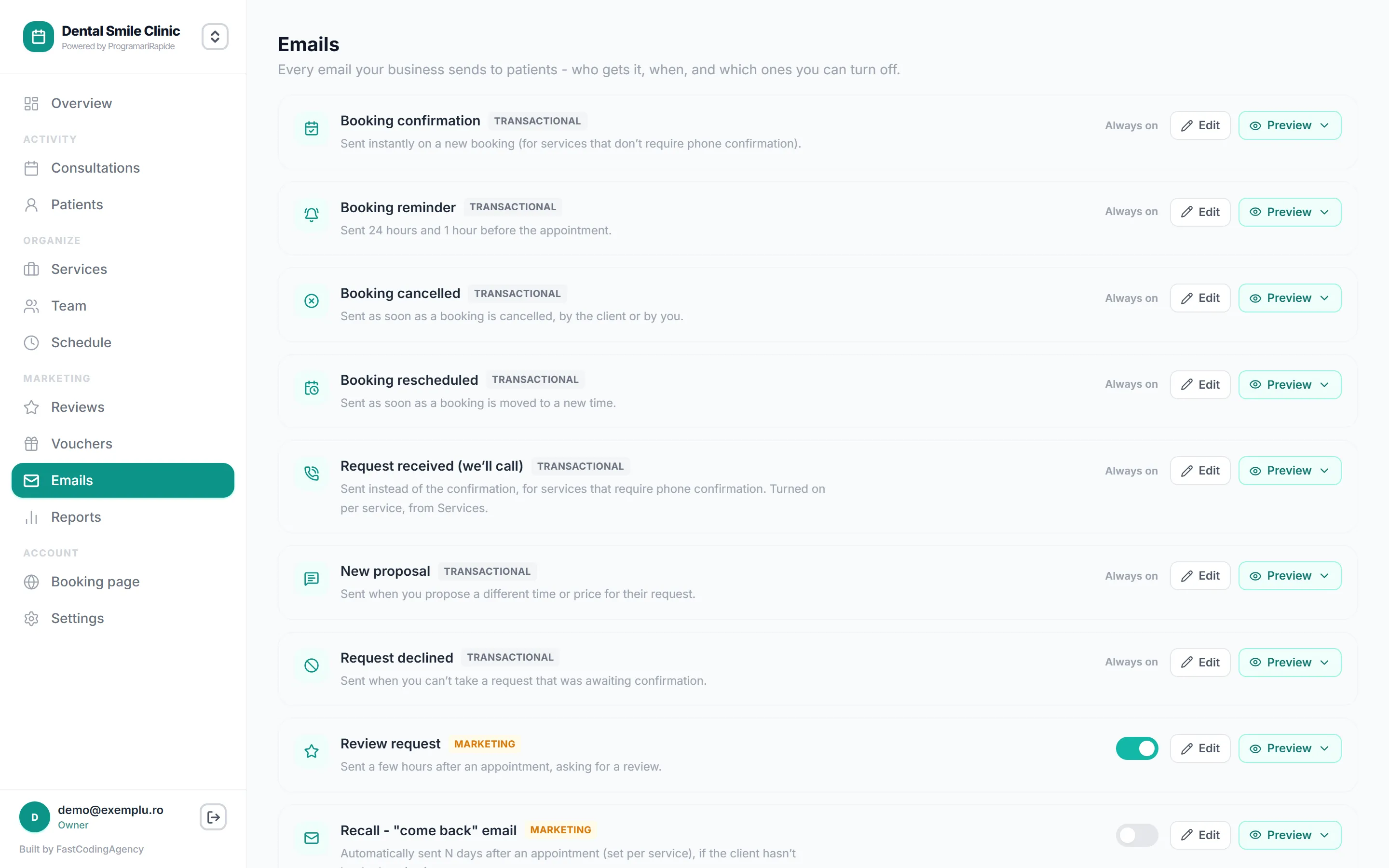
2. Make cancelling easier than not turning up
It sounds paradoxical, but it is the method with the biggest effect. If the only way to cancel is to phone you during working hours, many clients won’t call. It is easier for them not to come.
Give them a one-click way out instead. In Programări Rapide, both the confirmation and every reminder include a link the client can use to cancel or move the booking themselves. The slot frees up in the calendar and you get an email. In a psychology practice, where a missed session means 50 empty minutes, the difference between “I found out yesterday” and “I found out when they didn’t show up” is the difference between a lost hour and one given to another client.
So you aren’t caught out by last-minute cancellations, set a cancellation window: how many hours before the appointment people can still cancel or reschedule online. You will find it under Settings → Booking link → Rules. It is 48 hours by default, and you can adjust it to suit your pace.
3. Ask clients to confirm they’re coming
A reminder informs. A confirmation gets you an answer. When the client taps “Confirm” in the email, you know in advance who you can count on, and the unconfirmed bookings turn into a short list of people worth calling in the morning.
A garage that schedules its work by lift feels the difference straight away. A car that doesn’t arrive at 8:00 keeps a lift idle for an hour and a half. A call at 7:30 to those who haven’t confirmed can free the slot for an urgent job.
For services you can’t accept without knowing more (a diagnosis, a job where you need to see the car or the X-ray first), you can require phone confirmation for each service separately, from the Services screen. The booking then comes in as a request, and you approve it after speaking to the client.
4. Don’t let people book too far ahead
The earlier a booking is made, the easier it is to forget. A lot can change in three months: a holiday moves, a plan falls through, the problem gets solved some other way. A booking made last week is far less likely to end up without a client.
Two settings help here, both in the booking rules:
- the booking horizon sets how many days ahead people can book online. For most businesses, 30-60 days is enough
- the minimum notice sets how close to the slot people can still book, and protects you from bookings made ten minutes before by people who then don’t make it
The exception is your regulars. A patient with ten physiotherapy sessions ahead, or a client who comes in for a haircut every four weeks, is better booked as a recurring series, in one go. The reminder before each session does the rest.
5. Put the rule on the booking page, don’t negotiate it on the phone
A rule you only hear about after missing an appointment feels like a punishment. The same rule, read before booking, is just information.
Write two or three sentences on your booking page saying what happens: until when people can cancel free of charge, what follows a no-show, whether some services need a deposit. No threatening tone and no small print. A salon that writes “If you can’t make it, please let us know 24 hours ahead. For services over two hours we ask for a 30% deposit” doesn’t drive clients away. It only filters out the ones who wouldn’t have come anyway.
As for deposits, honestly: they belong on long or expensive services and on clients who have missed before, not on every booking. Programări Rapide doesn’t take online payments, so the deposit is paid by bank transfer or at the desk, and you mark the booking as paid, straight from its details.
6. Keep track of who misses appointments
Most clients never miss. A few miss often. Without a record, you treat them all the same: either too strict with everyone, or too lenient with the few.
When you mark a booking with the “No-show” button, its status changes and it is added to the client’s record, where you can see how many no-shows they have and what share of their visits that is. A physiotherapy centre can go one step further and tag patients, for example with “Missed”, to spot them straight from the list.
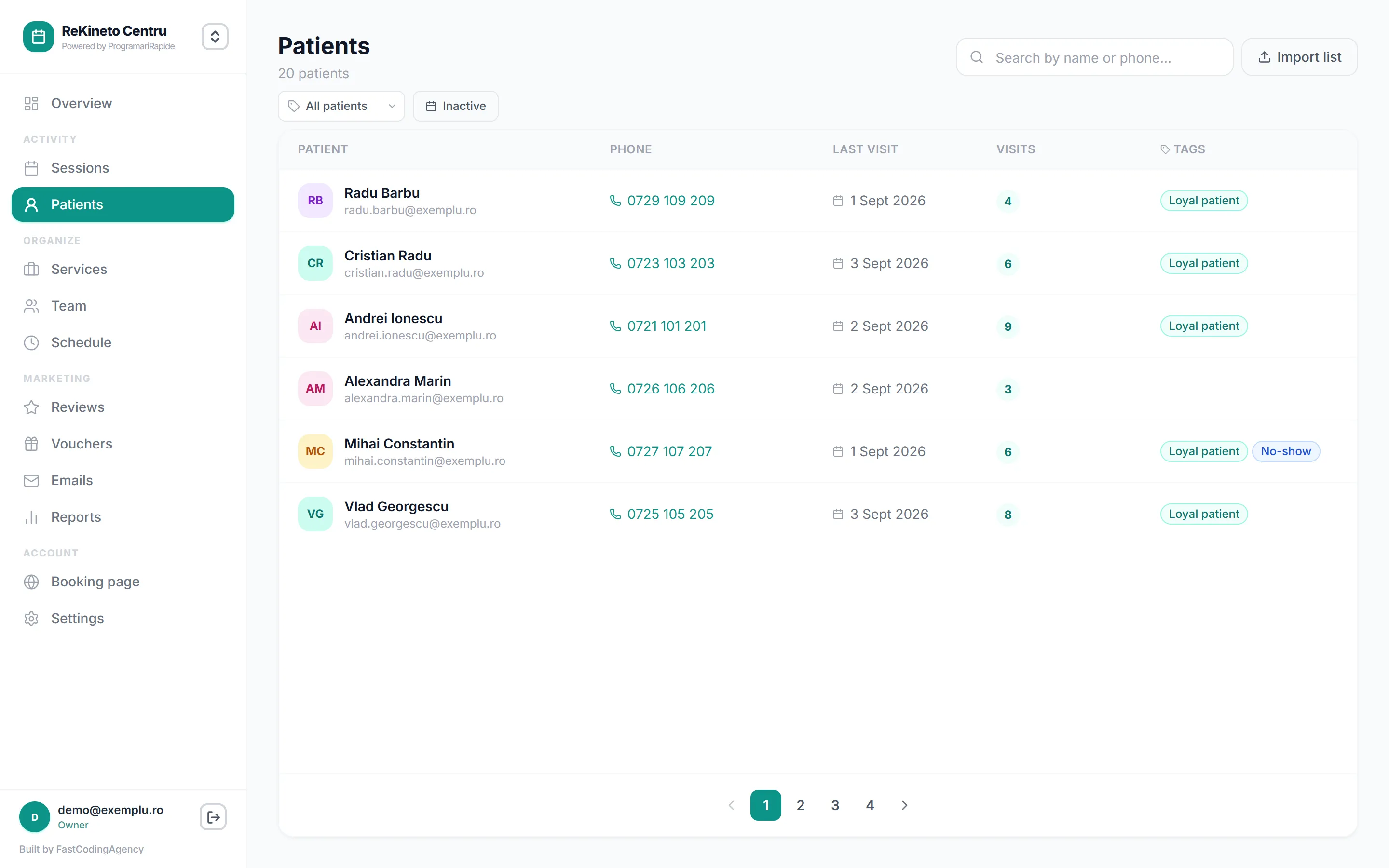
With the numbers in front of you, the rule becomes simple and fair. After the first no-show, nothing. After the second, a short, polite conversation. After the third, mandatory phone confirmation or a deposit, for that client only, not for everyone else.
7. Measure it, month by month
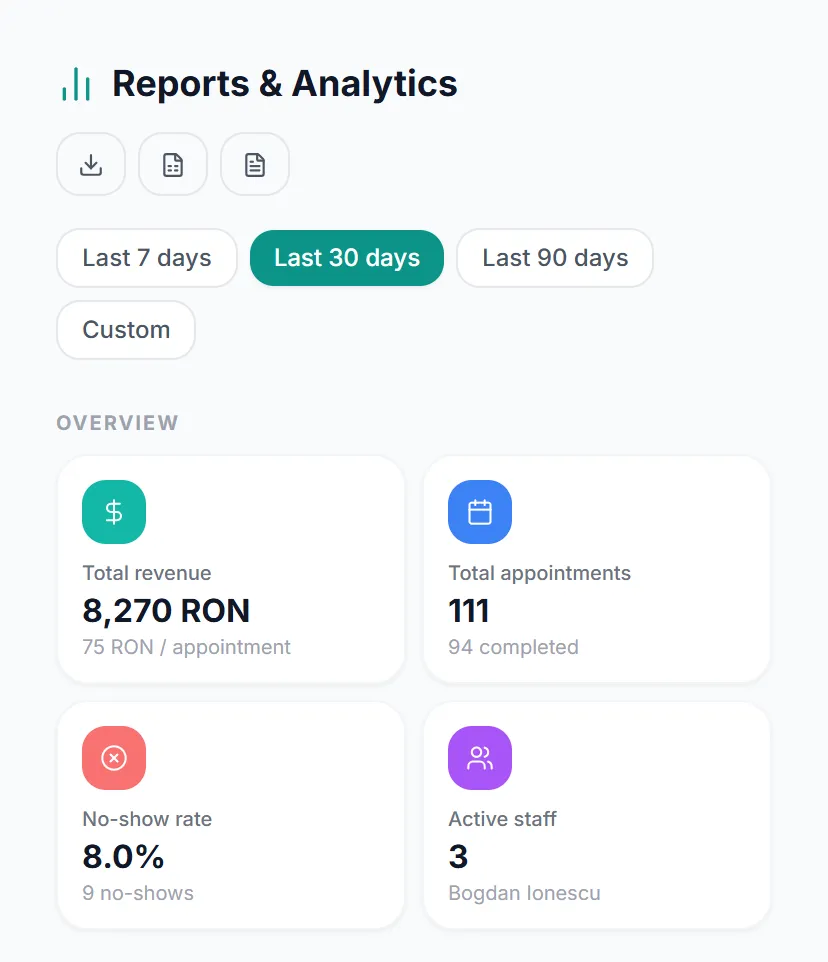
You can’t tell whether the changes work without a number to compare against. The no-show rate, the share of the month’s bookings where the client didn’t come, is the only indicator you need.
It sits right on the Reports screen, next to revenue and the number of bookings, along with the change from the previous period. Look at it once a month. If it dropped after you turned on the reminders and put the rule on the page, you have your confirmation. If not, look for the pattern: certain services, certain days or certain clients.
In short: where to start
If you only have time for one change this week, make it the 24-hour reminder with a cancel link (methods 1 and 2). It solves most of the problem, costs nothing and bothers no one.
Then, one at a time: the rule written on the page, the record of absences and a monthly look at the rate. The rest (phone confirmation, deposits, the booking horizon) you can fine-tune once you see what the numbers say.
If you still keep your bookings in a diary or on WhatsApp, the guide to digitising in 5 steps gets you to automatic reminders in a single afternoon. What the app can do for any kind of business, from practices to garages, is on the client booking page, and what booking looks like from the client’s side is on the online booking page.
Frequently asked questions
What no-show rate is normal?
It depends on the trade and on how far ahead people book, so a general figure tells you little. It is more useful to measure your own rate for a month before changing anything, then follow it month by month. If it goes above one booking in ten, work through the methods in this article.
Do email reminders work, or do I need SMS?
They work, as long as they go out on time and include a link to cancel or reschedule. A reminder isn't there to persuade the client to come but to give them an easy way to let you know. Programări Rapide sends the confirmation and the 24-hour and one-hour reminders automatically, by email and for free.
What do I do with a client who keeps missing appointments?
First, check their record to see how often it has happened. After the second no-show, a short, polite conversation is usually enough. After the third, you can ask them to confirm every booking by phone or to pay a deposit, in line with the rule already shown on your booking page.
Is it worth asking for a deposit? Won't I lose clients?
You will lose a few if you ask everyone. A deposit belongs on long or expensive services and on clients who have missed before, not on a half-hour haircut. Programări Rapide doesn't take online payments: the deposit is paid by bank transfer or at the desk, and you mark the booking as paid.
Read next
- 01 How to digitise the bookings in your business in 5 steps Five steps done in one afternoon, after which clients pick their own time and the reminders go out without you. With examples from several different trades.
- 02 Free vs. paid booking app - which one do you pick? "Free" means four different things in booking apps: a 14-day trial, a hidden commission, a plan with limits, or an app that is actually free. What you get in each case, and what the paid option costs you over a year.
Try the app, free
Entirely free, with no time limit and no card. Unlimited bookings, staff and services, a public booking page and email notifications, in any trade.